My first sight of code review tools was when making a PR for someone else's repository. After opening it up, I went to do other stuff and shortly after checked my inbox, only to find a bazillion new emails about a bot (and the maintainer) doing stuff to my branch. I didn't think much of it at the time and just assumed it was some slop-tool that the dev had set up, and the spam had been collateral damage. But I did remember the name: CodeRabbit. At first, that whole thing sounded like A claim promoted with exaggerated promises and little reliable proof, and that made me even more skeptical.
Not much later, I was watching a video from Theo (something that I don't normally do) and for some reason, decided not to skip the sponsored segment (something that I don't normally do either); and to my surprise, it was CodeRabbit. Again. "Wow, these guys sure have big bucks to pay content creators," I thought to myself, since I can't imagine a segment on Theo's video being cheap.
Fast forward to the end of June, and a tweet popped up on my TL while scrolling Twitter, as one normally does.


introducing greptile's free tier. we've made a lot of improvements over the past few months to greptile, and we want to share those with more developers. you can now get 50 reviews per month as a solo developer for free
And it made me scroll back. Did I just read "free"? I have no clue what these guys do, but if I can get "paid value" for 0 bucks, you better sign me up. And sign up I did.
A pleasant surprise: Greptile
After the smooth onboarding, I was in the dashboard. They didn't ask me to configure anything besides the basics, so I looked through the tabs and settings in order to tweak it accordingly. Again, everything went surprisingly smoothly: every feature was well explained and I didn't even have to change anything that much, the defaults were already good enough. Time to try it out, I guess, but I doubt it'll do much; after all, my workflow is already pretty optimized to not miss out on this type of stuff... Or is it?
PR after PR, it was finding stuff my agents were missing. Wow, I wasn't expecting this to actually be useful. That's a nice add-on to my The set of tools and services a developer uses together as part of their workflow.
But then, disaster struck when I least expected it.
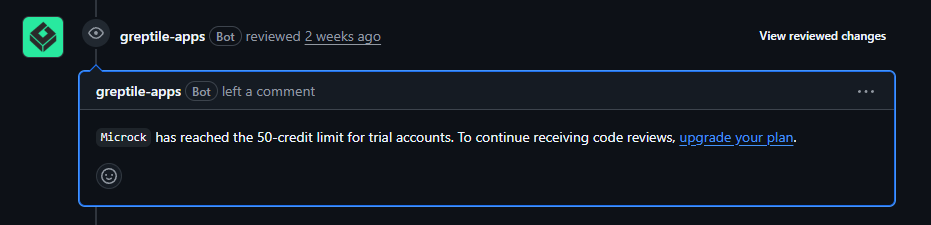
That fast!? It's only been 3 days... I can't believe it. Their plan worked flawlessly; they got me hooked up. I went to their pricing to see if whatever they had was worth it. Turns out their "Pro" plan costs $30/month but gives the exact same 50 credits as the free account. I'm not paying $30 a month for 3 days' worth of usage, that's for sure.
But then again, something else caught my attention while on the pricing page. Another "Free" keyword, and it wasn't the same one as earlier: "Greptile is free for qualified non-commercial projects with A permissive open-source software license or A permissive open-source software license maintained by the Apache Software Foundation licenses." Oh, you bet I'm applying to it. I went onto the offer page and it only asked for name, repository link, and email... That's weird, way too easy. But what's the worst that can happen? I assumed they reviewed each application manually, thus I sent my two most starred Open-source software: code released under a license that lets anyone use, study, and modify it repositories (thinking they wouldn't work, since they aren't that big/popular) and waited for an answer. They'd probably take a few days if not weeks to reject it, but I'm patient.
I went to bed a few hours later, when suddenly I got two new emails from Greptile titled "Your Greptile OSS Maintainer discount." Oh well, as expected, I did get rejected, probably by an automatic check that needed X amount of stars to join... But on closer inspection, I hadn't been rejected. I qualified for the OSS Maintainer discount.
Sadly, it would only make Greptile work on the repositories that I sent, but again I tested my luck and sent a few other repositories that didn't have any stars in order to check something. And a few hours later, I got the same email, which confirmed what I was thinking: they don't care about stars, they only care about the LICENSE in place (it has to be MIT or Apache). That's super neat.

i started using @greptile a few days ago (since they offer 50 free monthly reviews) and had been loving it, but quickly ran out of credits discovered they had an OSS program, sent an application, and within 4 hours I received a 100% off. this is how stuff should be done, 10/10

So much for documentation: Codex PR Review
Following GPT 5.6 Sol release, I speedran my quota accidentally.* Luckily, I had a few banked resets saved up (thanks Tibo) that were waiting just for this moment; I only had to find where I could make use of one. I then proceeded to spend a good chunk of time going through every single page in the ChatGPT/Codex dashboard without any luck (at the time this happened, I could only do so through the Codex app, which I don't use), but every cloud has a silver lining. It allowed me to check out the PR section in the usage page that I had ignored for so long due to not fully knowing if it took usage from my Codex quota, or if it used a different quota (just like GPT 5.3 Spark does). Anyhow, with my newly acquired x20 Pro quota, surely I could now afford to at least give it a try.
And it did work nicely alongside Greptile; it complemented it pretty well. Not sure if finding the same or more bugs as it (I doubt it), but it was detecting stuff, which is always a good sign.
Though, I still don't know and couldn't find any information about the quota usage. As Kanye once said: "I guess we'll never know."
* This is a complete lie btw. It happened like 2 weeks before Sol, but it was a solid opener.
Third time's the charm: CodeRabbit
As a result of having my expectations subverted by Greptile, I decided to look into CodeRabbit. After all, the worst that can come out of it is knowing that Greptile is the most solid option I can use, and I always want to be up to date and make sure everything in my stack/workflow is as perfected as it can be.
Of course, the first thing that I checked was if they had some OSS program similar to what their competitor had to offer, and they did not; but after looking at their pricing page, I noticed a box with some interesting information, for some reason hidden behind 1-2 page scrolls (I think this is a mistake; something as important as this should be one of the first things I see when I load the page, or at the very least be much more noticeable. The red outline is up to what I see on page landing).
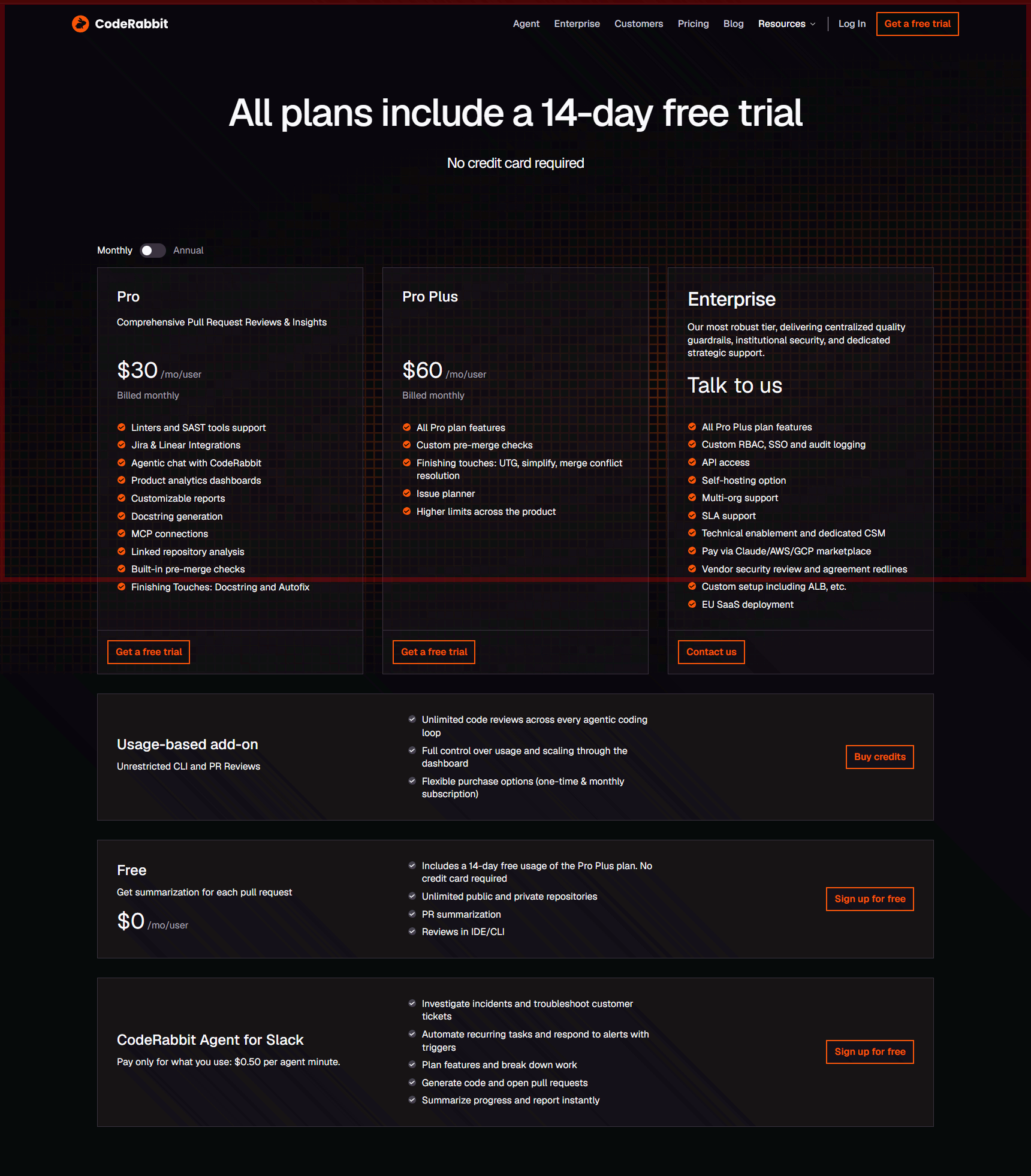
Free. Yes, again. But this time was slightly different; the advantages weren't at all clear at first glance: did it only offer a summarization for each pull request? This whole page seems to scream at me about the Free Trial.
I had to go out of my way, to their documentation, in order to find information about their plans. Yes, you're reading this right: their documentation page, normally used by companies and developers to explain more technical and in-depth stuff, was the one to have the information about Plans and pricing, one of the essential things that every client/user should have easy access to.
Not off to a good start, but at least they did offer a Free/OSS plan. It could be worse.
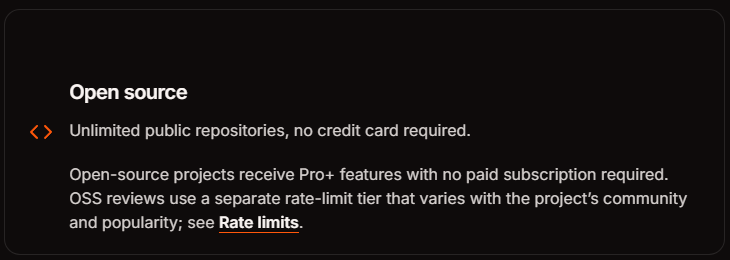
I signed up, yada yada yada. And again, afterwards, proceeded to check the settings. And let me tell you, I was overwhelmed by how much stuff was customizable. Not inherently a bad thing (I'd rather be able to modify something if I don't like it than not have the option to), but a small onboarding guide would've been appreciated. The tabs and descriptions are not really self-explanatory; it's not intuitive to use. Diving into their wiki to understand the product should be optional, not a requirement.
After superficially setting up what I was able to at first glance, it was looking good to me. I tried it in a PR, and I'm not trying to be a hater, but I preferred Greptile's way of showing things.
Coming back to the customizability I mentioned earlier, a specific feature caught my attention: you're able to set up a A file extension for YAML, a human-friendly data-serialization format used for configuration file on the root of your repository and modify the reviewer's behavior. Of course, I'm lazy; I'm not going to be doing that for every single repo, so I made a SKILL.md in order to automatically write a tailored file for each repository where it's run in. You can find it here.
SKILL.mdTailor, validate, and calibrate a repository's .coderabbit.yaml from codebase evidence and real review feedback.
Name: tailor-coderabbit-config
Description: Tailor, validate, and calibrate a repository's .coderabbit.yaml from codebase evidence and real review feedback. Use when creating, auditing, optimizing, or iterating CodeRabbit configuration, path instructions, path filters, code guidelines, review tools, auto-review behavior, inheritance, or pre-merge checks for a specific repository.
Tailor CodeRabbit Config
Build a calibration, not a preset. Start with the smallest configuration justified by this repository, then tune it from actual CodeRabbit behavior.
Select the branch
- Bootstrap: Create
.coderabbit.yamlwhere none exists. - Audit: Check an existing file against the repository and current schema without changing it unless asked.
- Tune: Change an existing file to address observed misses, noise, or workflow friction.
- Operate: Inspect resolved configuration or run a review after the config is ready and the user authorized live PR interaction.
For every branch, read mechanism-selection.md before drafting.
1. Establish authority and ground truth
- Read the repository's applicable agent instructions and development contract.
- Inspect version-control status before editing. Preserve unrelated work.
- Locate the existing
.coderabbit.yaml, central configuration clues, CodeRabbit comments/checks, and repository ownership. - Fetch the current schema rather than trusting remembered fields or copied examples:
Fetch the current schema rather than trusting remembered fields or copied examples:
curl -L -sS -o /tmp/coderabbit-schema.v2.json \
https://coderabbit.ai/integrations/schema.v2.json- When a PR exists, inspect existing CodeRabbit reviews and configuration comments read-only. Post
@coderabbitai configurationonly when live PR interaction is in scope. On a third-party repository, require explicit permission before any CodeRabbit trigger. - Treat the resolved configuration as the runtime truth. Repository YAML can be changed by central config, UI settings, inheritance, and global overrides.
Completion criterion: the active repository, applicable instructions, current config sources, ownership, and live schema are known, or each unavailable item is explicitly reported.
2. Build the review map
Inspect enough code and configuration to account for every material subsystem. Use repository-native structural search for definitions and dependencies, and exact search for config and literal paths.
Record:
- languages, frameworks, package managers, and workspace boundaries;
- runtime entry points, public APIs, protocols, persistence, migrations, and generated code;
- trust boundaries such as authentication, authorization, secrets, payments, and external input;
- test layout, CI gates, linters, formatters, security scanners, and their config files;
- repository instructions such as
AGENTS.md,CLAUDE.md, Copilot instructions, and coding standards; - release-note, documentation, and PR-title conventions;
- bot PRs, draft workflow, target branches, and expected review cadence;
- historical CodeRabbit comments, especially repeated misses and false positives.
Do not infer a convention from one file when repository-level enforcement or representative examples are available.
Completion criterion: every material subsystem and changed-file family has an owner, an existing enforcement path, or an identified review gap.
3. Create the evidence ledger
Before writing YAML, produce this compact ledger in chat or a user-requested artifact:
| Concern | Repository evidence | Existing enforcement | CodeRabbit mechanism | Decision |
|---|---|---|---|---|
| Example: SQL migrations | migration directory and runbook | CI syntax check only | custom check in warning mode | add |
Use CodeRabbit only for a real gap. Prefer the existing linter, CI test, or guideline document when it already enforces the concern reliably. Do not duplicate prose across global tone, **/* instructions, path instructions, and custom checks.
Completion criterion: every proposed non-default setting has repository evidence and one reason it belongs in CodeRabbit rather than existing enforcement.
4. Draft the minimum config
Start with the schema directive:
Start with the schema directive:
# yaml-language-server: $schema=https://coderabbit.ai/integrations/schema.v2.jsonThen apply these rules:
- Omit schema defaults unless the explicit value documents an intentional policy or protects against inherited settings.
- Set
inheritanceonly after resolving the actual organization or central-config behavior. - Use
path_filtersonly for repository-specific generated, vendored, or irrelevant paths not already covered by CodeRabbit defaults. Confirm each glob against real paths. - Use
path_instructionsfor concrete, path-scoped review gaps. State observable failure conditions and repository-specific context. Avoid generic**/*advice that restates normal code review. - Let CodeRabbit auto-detect standard guideline files. Add
knowledge_base.code_guidelines.filePatternsonly for additional standards files that truly apply as review criteria. - Configure a review tool only when the repository contains relevant files and any required tool config. Do not enable every available tool for completeness.
- Use custom pre-merge checks for deterministic pass/fail repository invariants that CodeRabbit can inspect in its read-only sandbox. Start new checks in
warning; promote toerroronly after calibration and only when request-changes behavior is understood. - Match
auto_reviewto the repository's real PR workflow. Exact bot usernames, labels, draft policy, branch regexes, and commit cadence must come from evidence. - Keep
tone_instructionsabout communication style. Put review criteria in the narrowest applicable mechanism. - Preserve useful existing settings unless evidence shows they are stale, duplicated, or harmful.
Completion criterion: the YAML contains only evidence-backed settings, every glob is deliberate, and no instruction has a narrower or more deterministic home.
5. Validate mechanically and semantically
Run live-schema validation without adding dependencies to the repository:
Run live-schema validation without adding dependencies to the repository:
uvx --from check-jsonschema==0.37.4 check-jsonschema \
  --schemafile https://coderabbit.ai/integrations/schema.v2.json \
  .coderabbit.yaml
If uvx is unavailable, use the repository's existing JSON-Schema-capable YAML validator or the official CodeRabbit YAML validator. Report any weaker validation path.
Then audit semantics:
.coderabbit.yamlis at the repository root;- every configured path, config file, username, label, and branch is verified;
- instructions agree with repository contracts and do not duplicate stronger enforcement;
- custom checks use information available in CodeRabbit's sandbox;
- blocking modes cannot surprise the repository's merge workflow;
- the diff contains no unrelated changes.
When live PR operation is authorized, request @coderabbitai configuration and compare the resolved result with intent. Do not treat local schema success as proof that inherited runtime behavior matches.
Completion criterion: syntax and live schema pass, semantic checks pass, and resolved runtime configuration is either verified or clearly marked unverified.
6. Run the calibration loop
For Tune or Operate work, inspect 3-5 representative reviewed PRs, or every available review when only 1-2 exist. With no review history, remain at Baseline. Classify each relevant CodeRabbit result:
- signal: correct, novel, and actionable;
- duplicate: already enforced or already reported elsewhere;
- noise: incorrect, stylistic, or not actionable.
Should you use Code Review tools?
As you can see from the start, I was skeptical about these tools. I'm open to changing my mind about anything if proven wrong, and proven wrong I was. These are fantastic tools for any serious developer trying to perfect their A sequence of automated steps used in software development to build, test, and deploy code, with each of the tools having its pros and cons:
Plug and play: works immediately with little to no configuration, polished and pleasant to use and set up. It can be tedious to have to send an application for each new repository, and if not working on OSS, I'm sure it can get really expensive. Despite this, it's my favourite out of all of these.
What I like to call a good enough tool. Mostly everyone nowadays has a Codex subscription, and since this is included and not an extra cost, it's probably worth giving it a try (since it may or may not make use of your regular quota).
I've been harsh with this one, but if it's used by so many people, it has to be for a reason (A logical fallacy that argues something is good or true simply because it is popular #GG). It is the one with the highest skill ceiling due to its customizability, thus opening up the possibility of perfecting it for your own workflow and repositories, something not possible with the formerly mentioned.
I haven't used these tools anywhere near enough to juice them as much as possible, but with how fast the whole AI ecosystem moves, I feel like it was better for me to write this before I moved to the next thing and forgot about it.